
Point of sale · Made in Suriname
 CorePOSThe point of sale that keeps selling offline.
Point of sale and back office for shops in Suriname. Sell on an iPad, a Windows PC or an Android device, in SRD, USD and EUR. We take care of hosting and updates.
 CorePOS · Till
- 3
- currencies at the register: SRD, USD and EUR
- 35
- reports, from sales to stock and staff
- 2
- languages, Dutch and English
- 0
- servers of your own to look after
CorePOS includes Works without internet, SRD, USD and EUR, Held orders, Exchanges, Gift cards & credit, Customer accounts, Promotions, Stock across shops, Purchasing, Labels, Attendance, Face clock-in, Reports, Roles and security, AI assistants, Your own brand.
From the register to the back office, everything works together.
Sound familiar?
The internet drops, and the register stops.
The till depends on a connection that comes and goes. Customers pay in SRD, dollars or euros and the change is worked out on a calculator. Regulars run a tab in a notebook, each shop keeps its own stock list, and the figures for the day are a stack of receipts.
- A register that stops when the internet drops
- Change in three currencies worked out by hand
- Tabs for regular customers kept in a notebook
- No idea what one shop has that another is short of
- Reports put together after closing time
The fix
One register that keeps selling. One back office for every shop.
CorePOS keeps selling offline and syncs as soon as the connection is back. Prices and payments in SRD, USD and EUR at each shop's own rates, customer accounts, stock across shops, purchasing and 35 reports, all in one system. We take care of hosting and updates.
- Keeps selling without internet
- SRD, USD and EUR, with the change worked out
- Sell on account, with a statement per customer
- Stock per shop, with counts and transfers
- 35 reports, a dashboard and an audit log
Features
Everything for your shop, in one place.
From the register to the back office, everything works together. Real screens, with made-up example data.
1Works without internet
Keeps selling when the internet drops
Selling goes on when the internet drops. Everything is brought up to date as soon as the connection is back.
- Runs on an iPad or iPhone in Safari, a Windows PC or Android, and keeps its sales on the device
- As soon as the internet is back, the sales go to the back office
- Scan barcodes with a USB or Bluetooth scanner, or the device's camera
2Customer accounts
Sell on account, get paid later
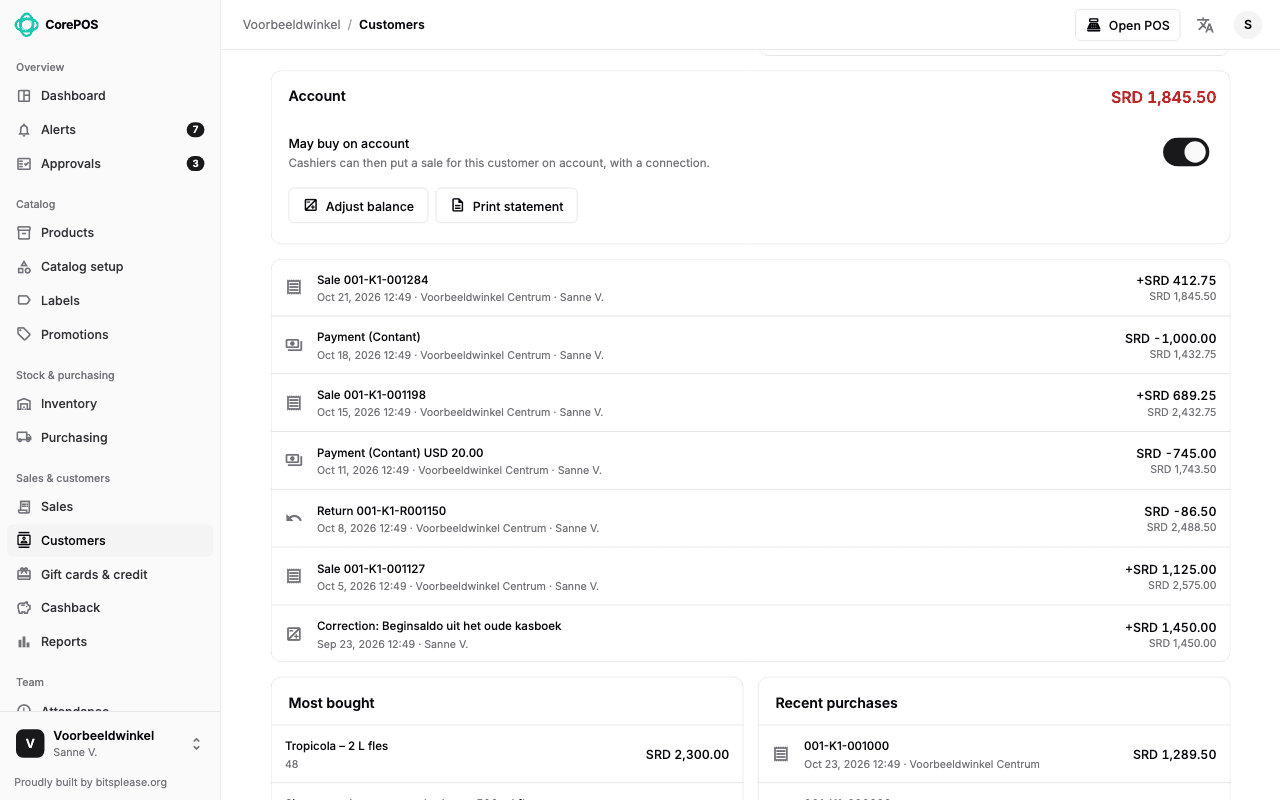
Regular customers buy now and pay later, and you always know who owes what.
- You choose which customers may buy on account
- The receipt shows what the customer owes after each purchase
- They pay off at the register, in part or in full, in any currency
- A statement per customer, and a report of everything still open
3Stock across shops
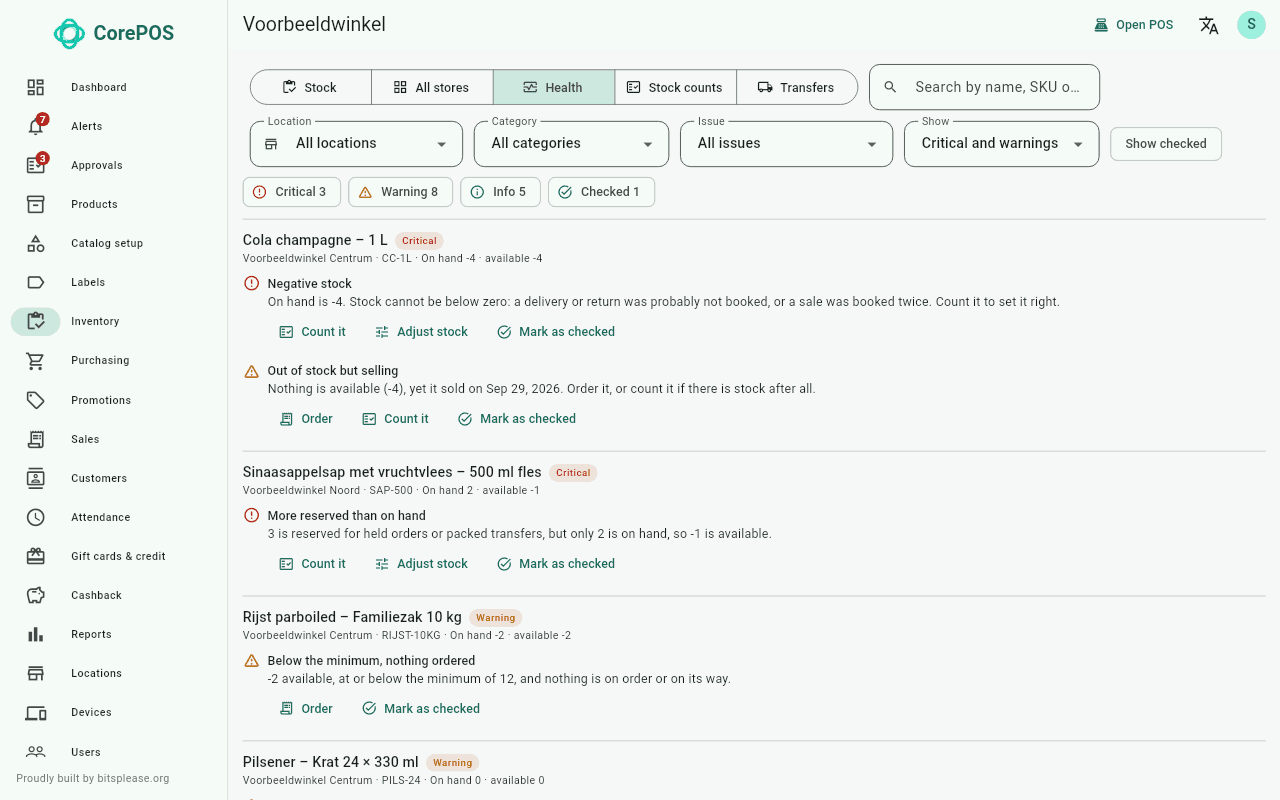
Every shop's stock at a glance
Stock per shop, with counts, transfers and signals.
- Count a whole shop or part of it, with several people at once
- Move stock between shops, with suggestions for who is short and who has spare
- Stock history for each product, and the stock of all shops side by side
- Warnings for negative stock or products not counted in a long time
4Purchasing
Order, receive and know your costs
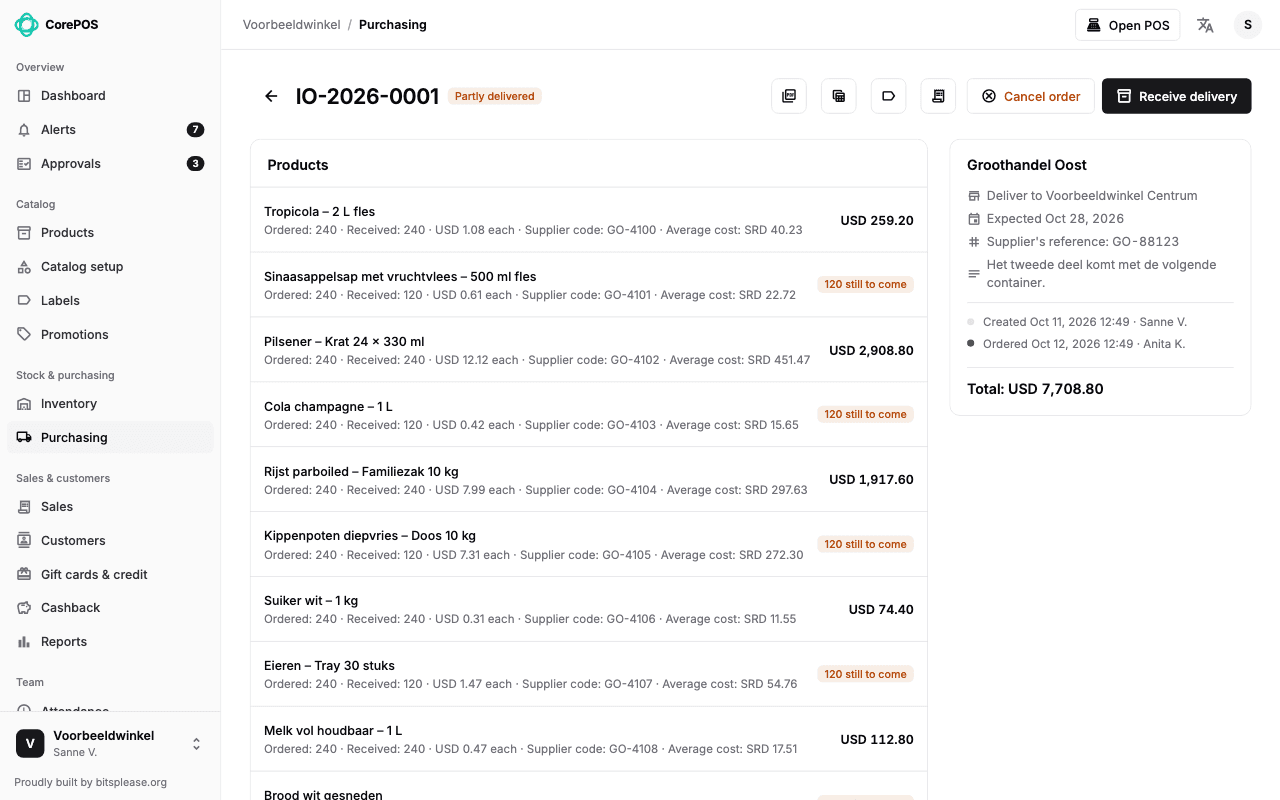
Order from your suppliers and receive the delivery in the shop.
- Orders per supplier and per shop, in SRD, USD or EUR
- Suppliers with their items and cost prices
- Receive a delivery in parts: what hasn't arrived stays on the order
- Create orders from a spreadsheet (.xlsx or .csv)
5Reports
See how every shop is doing
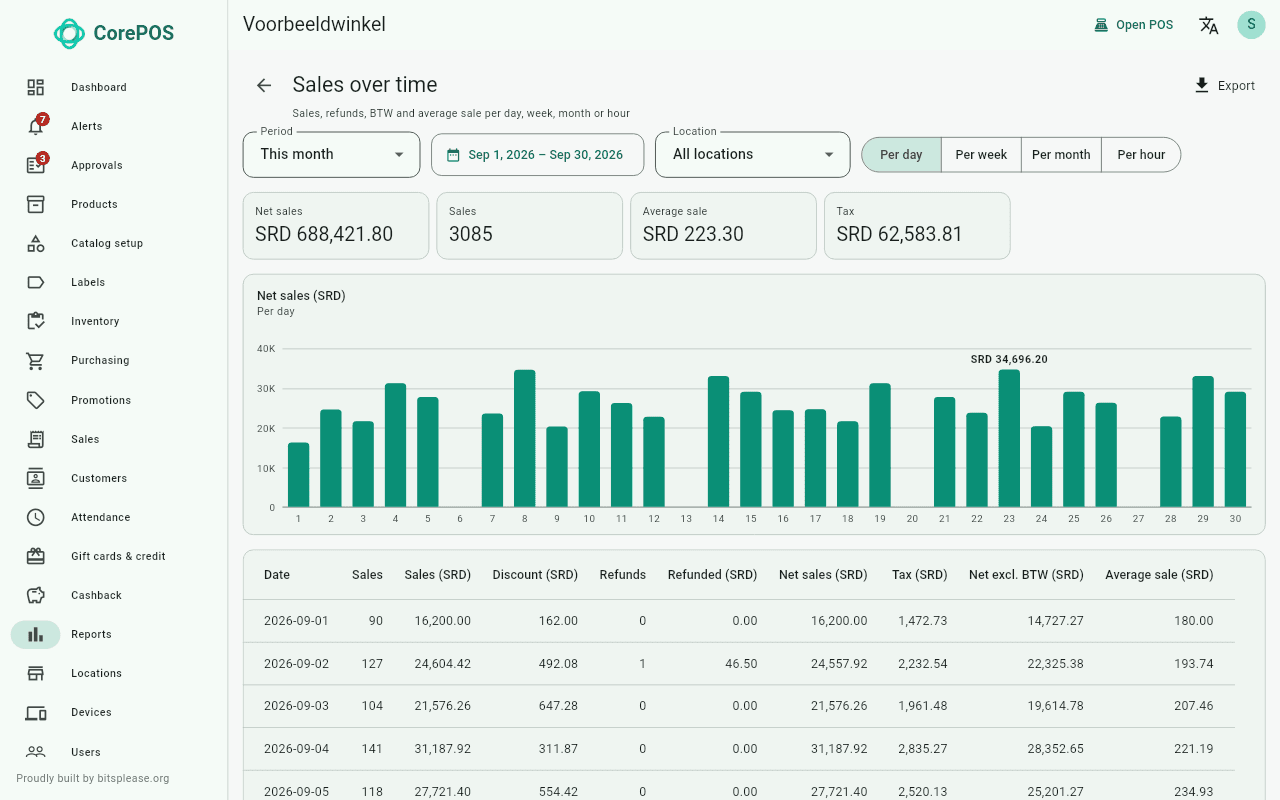
Reports from sales to stock and staff, a dashboard and an audit log.
- Sales by day, hour, product, category, brand, shop and cashier
- Payments, tax, refunds, discounts and exchange rates
- Margin and profit, stock value, purchases and what customers owe
- A dashboard with the main figures, and an audit log of who changed what
What's new
Recently added to CorePOS.
Sell on account, take euros, ask an assistant, sell on an iPad and let staff clock in with their face. All in the current version.
Sell on account
Regular customers take their goods now and pay later at the register. The receipt shows what they owe.
- Total
- SRD 412.75
- On account
- SRD 412.75
- Account balance
- SRD 1,845.50
Euros at the register
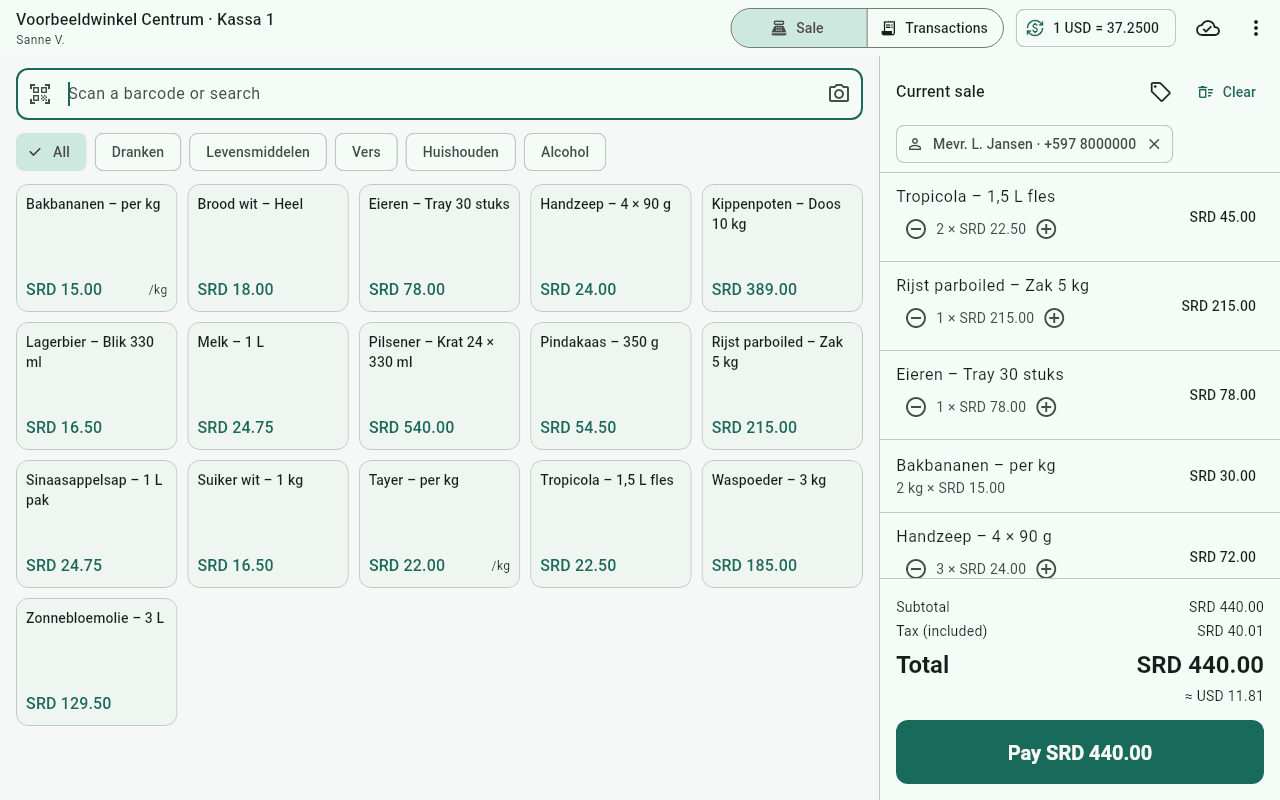
Customers pay in SRD, US dollars or euros, at the rates each shop sets. The register works out the change.
- To pay
- SRD 440.00
- or
- USD 11.81
- or
- EUR 10.93
Ask Claude about your shop
Connect an AI assistant such as Claude, ask what sold best or let it do back-office work. It works with your rights, nothing more.
Which products sold best last week?
Tropicola 1.5 L: 214 sold, SRD 4,815.00. Rice 5 kg: 96 sold, SRD 20,640.00.
Sell on an iPad
Open the register in Safari, with nothing to install. Print on a Star receipt printer and scan with a Bluetooth scanner or the camera.
Clock in with a glance
Staff clock in and out by looking into the camera of the register. A manager enrols each face, and the shop decides whether staff give their consent first.
Examples with made-up data
Built for the details
Every other feature, at a glance.
SRD, USD and EUR
Prices and payments in SRD, USD and EUR, with rates of their own for each shop.
Held orders
Put an order aside with fixed prices and reserved stock, and finish it later.
Receipts, exchanges and price changes
Exchange against the cart, change prices at the register and a barcode on the receipt.
Gift cards & credit
Gift cards, vouchers, store credit and cashback.
Products, prices and promotions
Your whole range in one place, with a different price per shop where you need one.
Labels
Print price labels for products and deliveries.
Attendance and face clock-in
Staff clock in and out at the register, or just by looking into its camera.
Staff, roles and security
Everyone sees and does only what their role allows, in each shop.
AI assistants
Let an assistant such as Claude answer questions about your business and do back-office work for you.
Your own brand
On request, the app carries your business's name, logo and colour.
Back office in any browser
Manage products, prices, users and registers from any modern browser.
How it works
From demo to first sale.
No servers to buy and no data to type in again. We set you up and bring your products over.
Request a demo- 1
See it in your shop
We show you CorePOS, in your own shop or online, and send you a proposal for your shops and registers.
- 2
We bring over your data
Your products, prices and stock come over from your old system, so you don't have to enter them again.
- 3
Start selling
On an iPad, a Windows PC or an Android device. Most shops can start with the devices they already have.
Hardware
Start with the devices you already have.
What you need for the register. Most shops can start with the devices they already have. Not sure whether yours will work? Ask us.
Register
- An iPad or iPhone with Safari. There is nothing to install.
- A PC with Windows 10 or later, 64-bit. It installs without administrator rights.
- An Android phone or tablet with the CorePOS app from Google Play.
- For face clock-in: the front camera of the iPad, or a webcam on the PC.
Receipt printer
- A receipt printer with a Windows printer driver.
- In the Windows and Android app: a network receipt printer with ESC/POS on port 9100.
- On an iPad: a Star receipt printer, through the Star PassPRNT app.
- A cash drawer plugged into the receipt printer opens for cash.
Label printer
- A ZPL label printer on the network.
- No label printer? Print the labels as a PDF.
Barcode scanner
- A USB barcode scanner that works as a keyboard. Most do out of the box.
- On an iPad or phone: a Bluetooth scanner in keyboard mode, or the camera.
iPad and iPhone
Open the back office in Safari and sign in. There is nothing to install.
Why CorePOS
Made in Suriname, for shops in Suriname.
The app is available in Dutch and English, with a full manual in Dutch.
Help in your own time zone
Need help? You talk to people here in Suriname, in Dutch or English, with a full manual in Dutch.
We move you over
Moving from another system? We bring over your products, prices and stock for you.
Hosting and updates, taken care of
We take care of hosting and updates. You need no server of your own.
Prices
A proposal that fits your shop.
Prices are on request. Tell us how many shops and registers you have, and we will send you a proposal.
For a proposal, tell us
- Your name and the name of your business
- A phone number or email address
- How many shops and registers you have
- Your question, or what you'd like to see
Questions
Questions, answered.
The questions shop owners ask us most. Is yours not here? Ask us.
Ask us a questionDoes CorePOS work without internet?
Yes. The register keeps selling when the connection drops and keeps the sales on the device itself. As soon as the internet is back, everything goes to the back office. A few things, such as selling on account, need a connection.
Which devices does the register run on?
On an iPad or iPhone in Safari, with nothing to install; on a PC with Windows 10 or later (64-bit); and on Android phones and tablets with the app from Google Play. The back office works in any modern browser.
Can customers pay in SRD, USD and EUR?
Yes. Each shop sets its own exchange rates. A customer can pay in one currency or in several, and the register works out the change.
Can regular customers buy on account?
Yes. You choose which customers may buy on account. The receipt shows what they owe, they pay off at the register, and you print a statement per customer.
Which printers and scanners can I use?
A receipt printer with a Windows driver or a network receipt printer with ESC/POS; on an iPad, a Star receipt printer through the Star PassPRNT app; a ZPL label printer on the network; and USB or Bluetooth barcode scanners. The camera of the device scans barcodes too.
Can I run several shops with it?
Yes. Stock, prices, registers and roles are per shop. You see the stock of all your shops side by side, move stock between them, and read the reports per shop or for the whole business.
Can I switch from another point of sale system?
Yes. We bring over your products, prices and stock from your old system, so you do not have to enter them again.
How does face clock-in work?
Staff look into the camera of a register that is switched on for it. A manager enrols each employee's face first, and the shop decides whether staff give their consent. It works on iPads and Windows PCs, with internet.
Can I use an AI assistant such as Claude?
Yes. Connect Claude to CorePOS and ask about your sales and stock in your own words, or let it do work in the back office. It works with your rights only, and you can disconnect it at any time.
What does CorePOS cost?
Prices are on request. Tell us how many shops and registers you have, and we will send you a proposal.
Where is my data kept?
With Supabase, in the ca-central-1 region. We take care of hosting and updates; you need no server of your own.
Is there help in Dutch?
Yes. The app is in Dutch and English, there is a full manual in Dutch, and you talk to people here in Suriname, in your own time zone.
Twelve months from now
Or keep the old till.
Fast-forward twelve months:
- A regular asks what they still owe. You flip through a notebook while the line waits.
- A customer pays in euros, and the cashier reaches for a calculator.
- One shop runs out of rice while the other has bags of it in the back.
- Closing time, and the day's figures are still a pile of receipts.
Want to see how it works?
We are happy to show you CorePOS, in your own shop or online.
- Keeps selling, when the internet drops
- SRD, USD and EUR, at the register
- Your products moved over, from your old system
- Help in Dutch, in your own time zone
Other products we offer
AI voice and chat assistant
Claudia AI Assistant
An AI receptionist that picks up, chats back, and calls out.
Wholesale ordering
Gemak.sr Sales
Orders from the road, straight to the office.
AI recruiting
CoreRecruit
Post a vacancy. AI shortlists the best applicants.
Restaurant ordering
CoreMenu
Your own ordering site. Your customers. Your margin.
Betting shop operations
Cashflow Pro
Run your betting shop from your phone.
Accounting
CoreBooks
Invoices out, payments in, books that add up.